LinkedIn Content System
A fully automated LinkedIn content engine — AI writes the post, generates a branded graphic, sends it for approval, and publishes automatically. Zero manual work on posting days.
This is the same system that runs my own LinkedIn content.
The problem
Consistent LinkedIn presence takes time most founders don't have
Showing up consistently on LinkedIn — 3 times a week, every week — is one of the highest-ROI things a service business owner can do. It builds trust, attracts inbound leads, and keeps you top of mind with your network.
The problem is the manual work. Coming up with an idea, writing the post, creating a graphic, resizing it for LinkedIn, scheduling it — that's 30–60 minutes per post, and the first thing to get skipped when the week gets busy.
The goal: build a system that does everything except the approval. A human still reads every post before it goes out — but that's the only step that requires a human.
System overview
Two n8n workflows running in tandem. The first generates and submits. The second handles the decision — approve or regenerate.
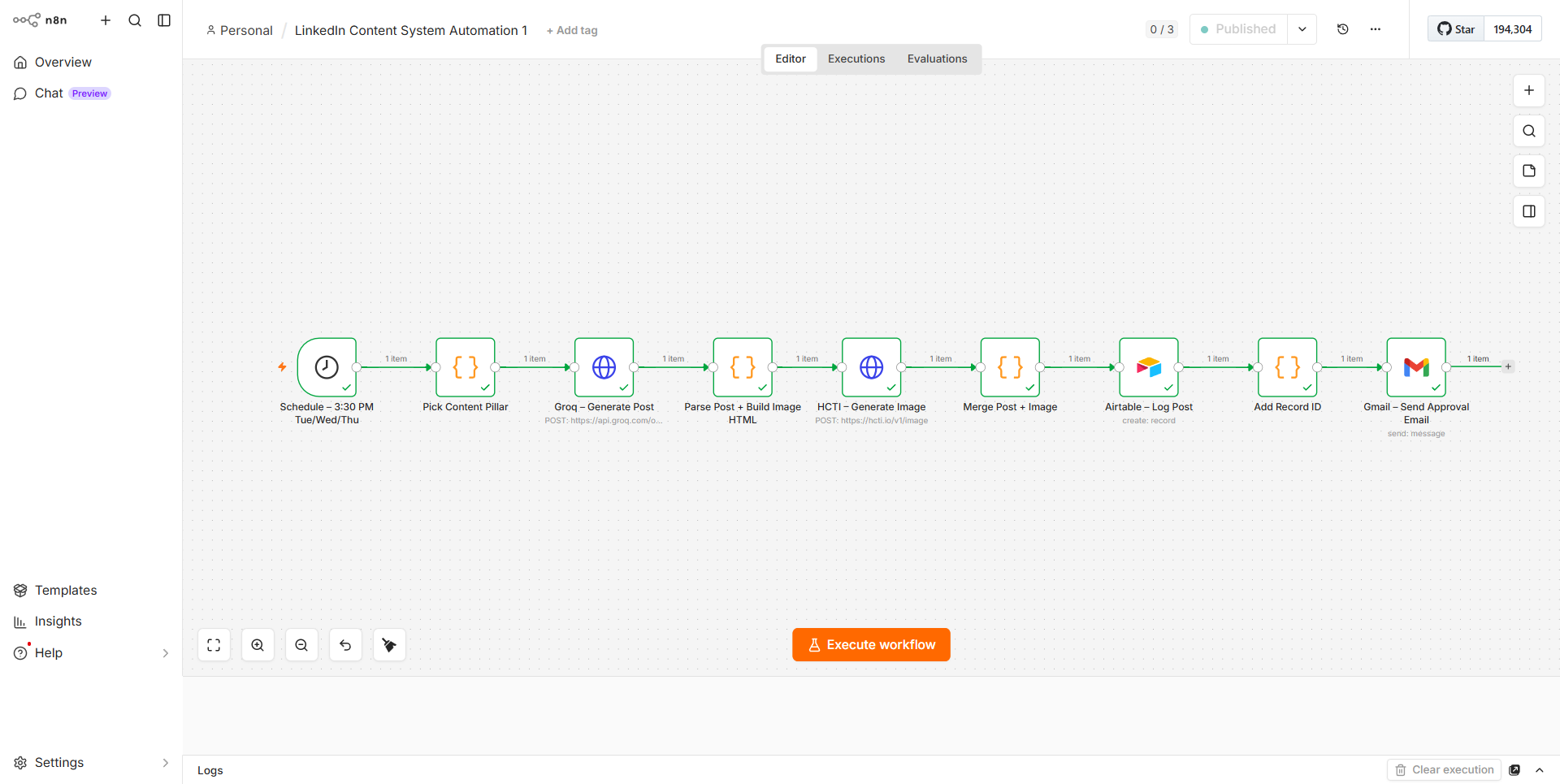
Workflow 1 — Scheduled generation pipeline
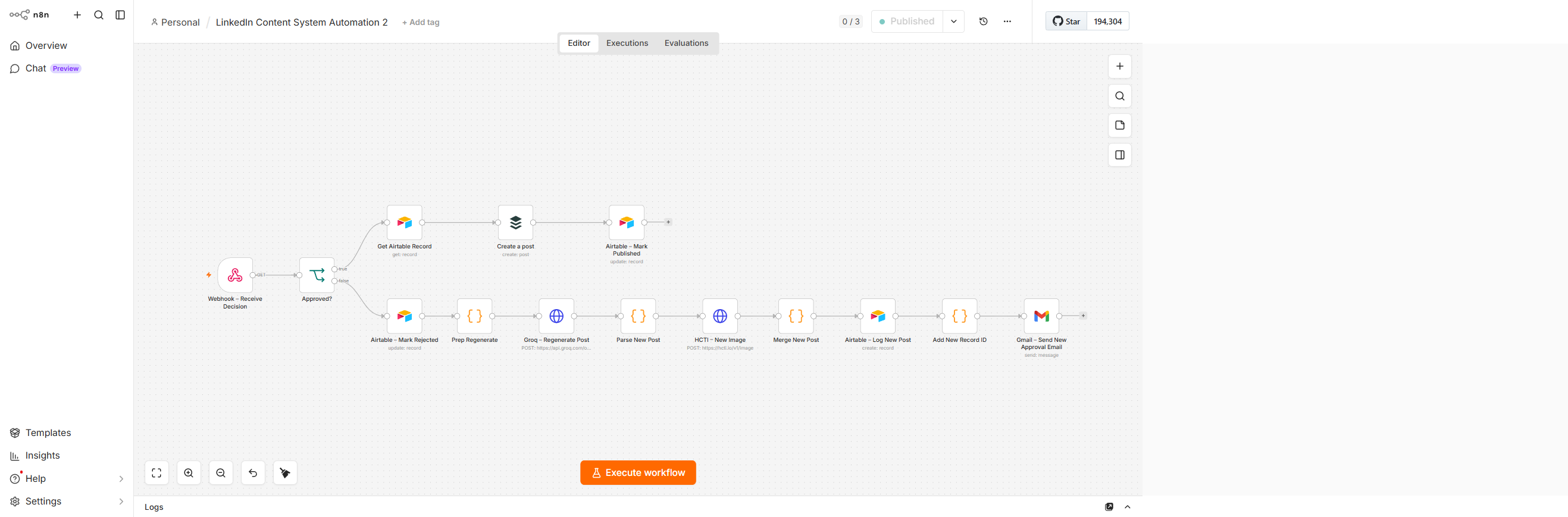
Workflow 2 — Approval / regeneration / publishing pipeline
How it works
Schedule triggers on posting days
The workflow fires automatically every Tuesday, Wednesday, and Thursday at 3:30 PM. No manual intervention needed — the system just runs. A content pillar is selected to keep posts varied across topics rather than repeating the same angle.
Groq AI writes the post
Groq's free LLM generates a full LinkedIn post — Hook, Body, and CTA — based on the selected content pillar and a system prompt trained on the target voice and audience. The output is structured as JSON so it can be cleanly parsed and routed in the next step.
A branded graphic is auto-generated
The post content is injected into a pre-built HTML/CSS template. HCTI (HTML/CSS to Image API) renders that template into a finished graphic — brand colors, font, and layout applied automatically. Four dynamic styles rotate to keep visuals fresh across posts.
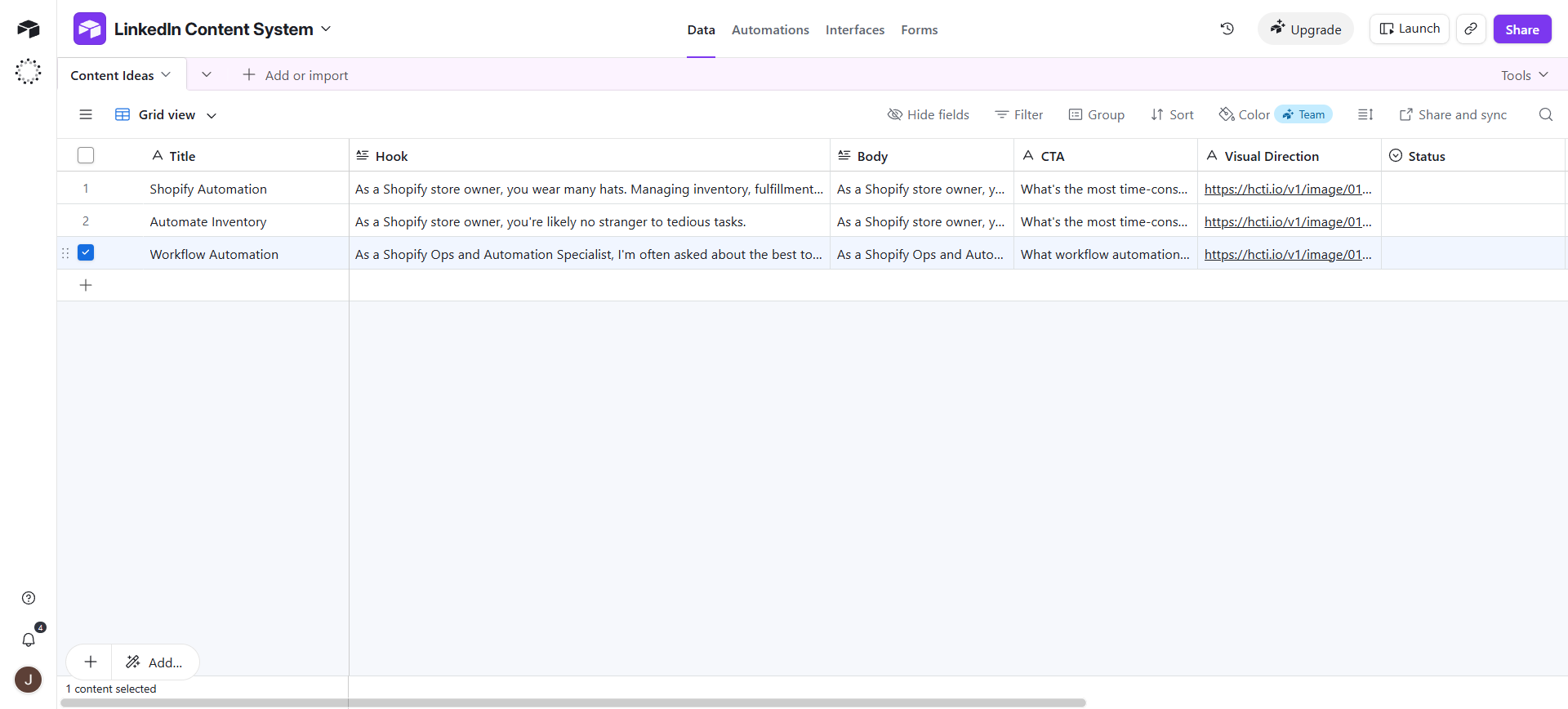
Airtable content database — each post logged with hook, body, CTA, visual direction, and status
Approval email arrives — one click to decide
An email lands in the inbox showing the full post copy, the generated graphic, and two buttons: Approve and Post or Reject — Generate New. One click is all it takes. No logging into anything, no copy-pasting.
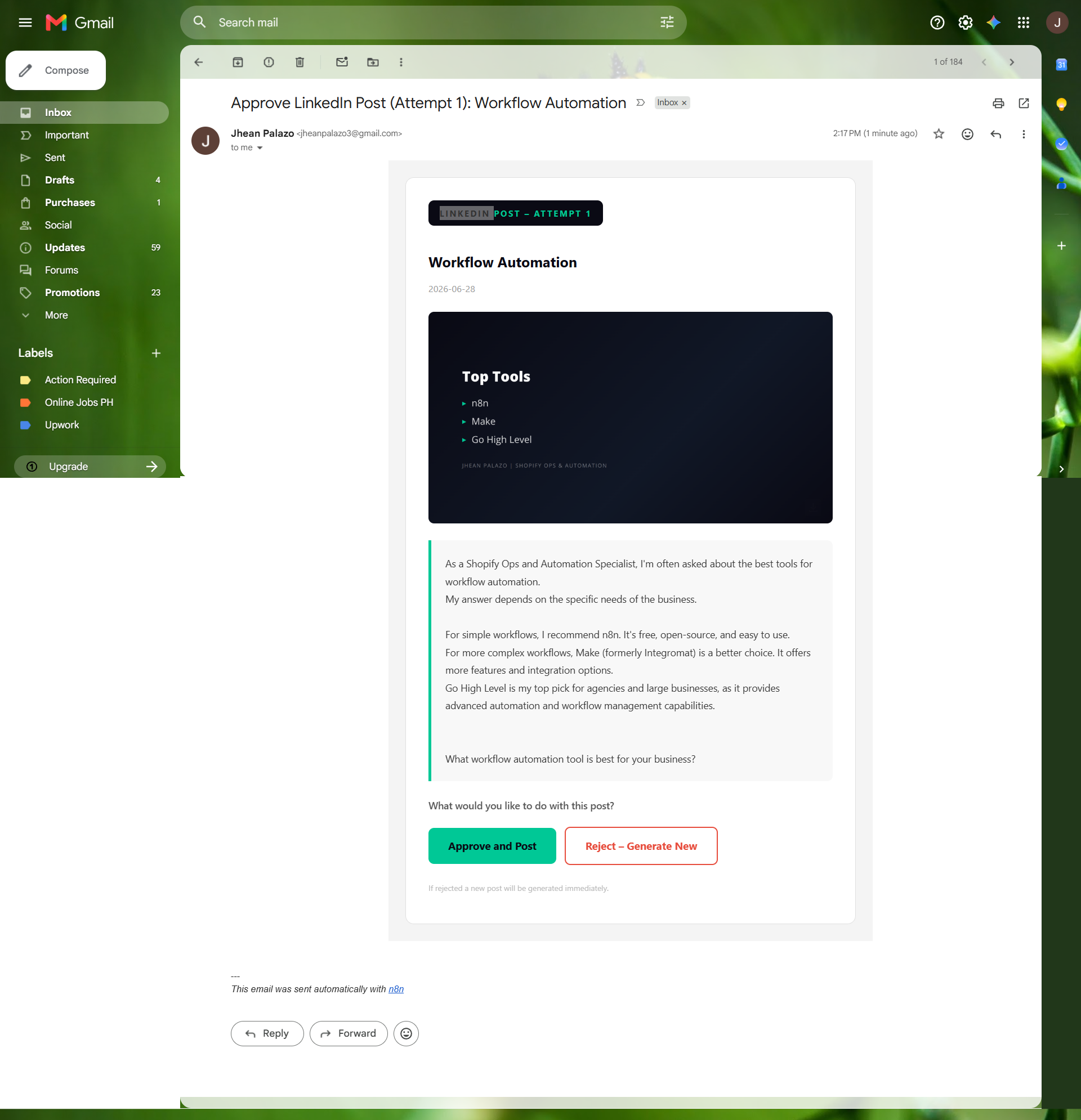
The approval email — full post preview + branded graphic + one-click decision
Approved → Buffer publishes to LinkedIn automatically
Clicking Approve triggers a webhook that fires Workflow 2. The post is retrieved from Airtable, sent to Buffer via API, and published to LinkedIn. Airtable is updated to "Published." The whole thing runs without opening a single app.
Rejected → regenerates instantly, new email sent
If the post isn't right, clicking Reject marks it in Airtable, triggers a fresh Groq generation with a new prompt variation, generates a new image, logs the new version, and sends a new approval email — automatically. No intervention needed.
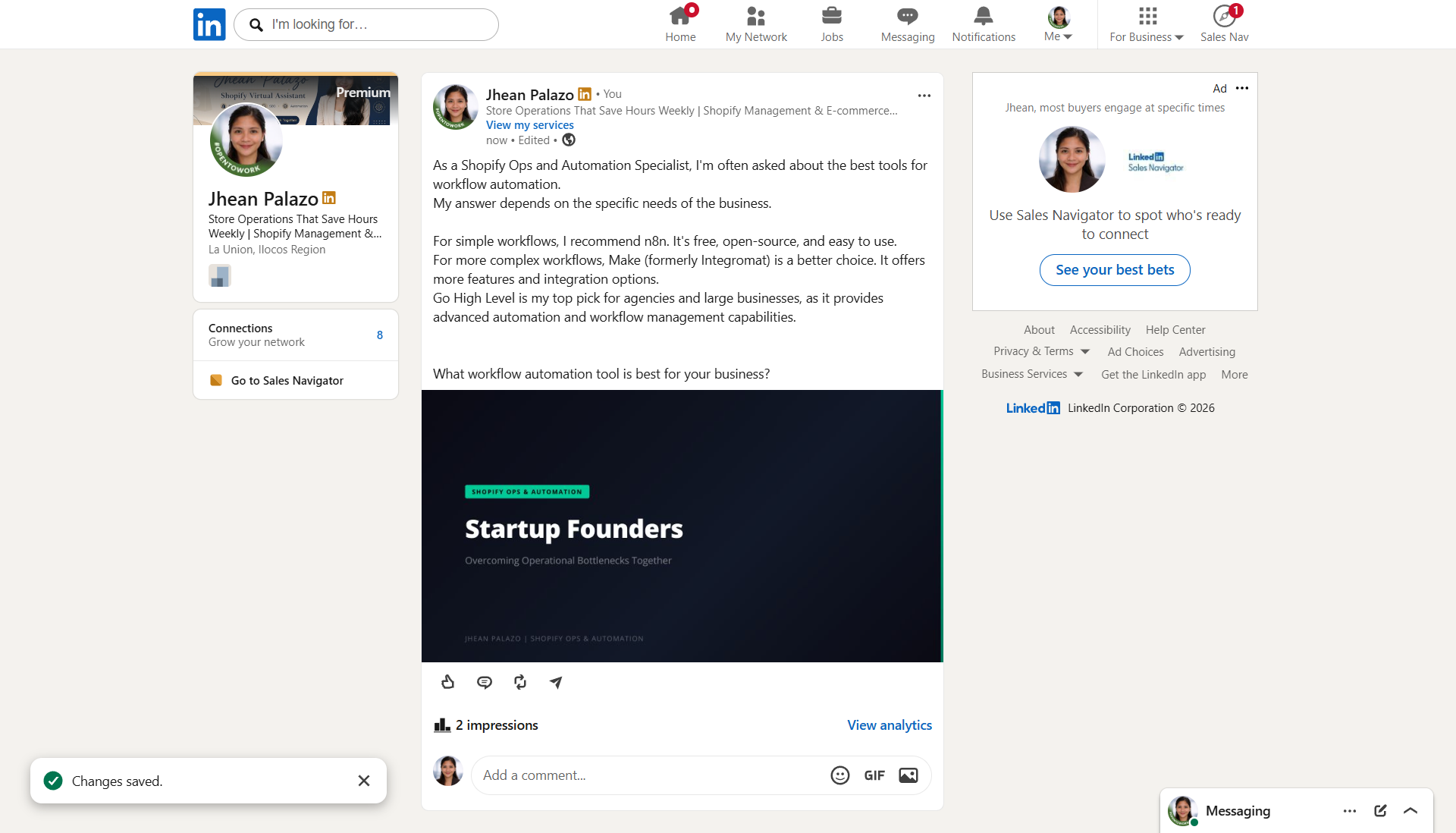
A live post published via the system — approved, scheduled, and posted with zero manual steps
Design decisions
Human in the loop — always
The system never posts without a human reading it first. The approval gate is the only manual step — and it takes 10 seconds. This protects against AI writing something off-brand or factually wrong.
Regeneration is built into the loop
Rejection doesn't stop the workflow — it restarts it. A new post is generated immediately and a new approval email sent. The iteration cost is zero because it's fully automated.
Airtable as the content ledger
Every post — approved, rejected, published — is logged with its full copy, status, and image URL. Full audit trail across all posts. Easy to review, analyse patterns, or reuse strong content later.
Free vs. paid tools
This system was built entirely on free tools to prove it works at zero cost. Here's what upgrading each component would unlock.
| Role | Free (current) | Paid upgrade | What it unlocks |
|---|---|---|---|
| AI copywriting | Groq (Llama) | Claude AI / GPT-4o | More nuanced voice-matching, better hook quality, consistent brand tone across every post |
| Graphic generation | HCTI (HTML→Image) | Canva API | Full brand kit integration, real design templates, font control, and visuals that look professionally designed — not just styled HTML |
| Scheduling & publishing | Buffer (free) | Hootsuite / Sprout Social | Richer analytics, multi-platform publishing, best-time-to-post recommendations, and team collaboration |
| Content database | Airtable (free tier) | Airtable Pro / Notion | More records, automation triggers built into the database, and richer views for content planning and analytics |
| Automation engine | n8n (self-hosted) | n8n Cloud / Make.com | Managed hosting, no server maintenance, built-in reliability monitoring, and better error alerting |
The free version is fully functional and production-ready. Paid upgrades improve quality and reliability — they're not required to get results.
Tools used
Want a content system like this built for your business?
This same setup can be adapted for any niche, brand voice, or posting schedule — with your preferred tools and a graphic style that matches your brand.